
IC RecorderICD-PX333M
Erasing a track mark
You can erase the track mark that is located at just before the current position.
- Stop at a position after the track mark you would like to erase.
- In the stop mode, select DISP/MENU - “Delete” - “Erase Track Mark,” and then press
 PLAY/STOP・ENTER.
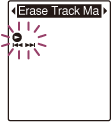
“Erase Track Mark?” is displayed and the track mark indicator and the track mark number to be erased will flash.
- Press –
 or
or  + to select “YES,” and then press PLAY/STOP・ENTER.
The “Erasing...” animation appears in the display window and the selected track mark will be erased.
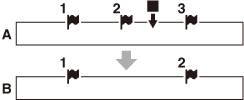
A. Before erasing a track mark:
 is the stop position.
B. After erasing a track mark: The track mark just before the stop position will be erased.
- Press (stop) to exit the menu mode.
Note
- You cannot erase track marks from a protected file. To erase track marks from the file, release the protection first, and then erase the track marks.
Hint
- To cancel erasing, select “NO” in step 3, and then press PLAY/STOP・ENTER.
 Go to Page Top