
IC RecorderICD-SX733/SX734/SX1000
Changing a file name
You can rename a file by prefixing characters from a desired template to the file name. A file in the recordable area can be renamed. You can choose characters to be added from the templates.
- Select the file which you want to rename from the
 tab of the folder list.
 - In the stop mode, select MENU - the
 tab -
“Change File Name,” and then press
tab -
“Change File Name,” and then press  .
.
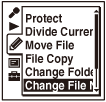
- Press
 or
or  to select the desired characters to be prefixed to the file name, and then press .
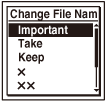
“Executing...” appears in the display window and the selected characters are added to the file name separated from it by an underscore (_).
(e.g. If “A” is added to the file 131215_001.mp3: A_ 131215_001.mp3)
- Press
 STOP to exit the menu mode.
Note
- You cannot change the name of a protected file. To change the file name, release the protection first.
- You cannot change names of music or podcast files.
-
You can rename the files in the recordable area (under the tab) only.
Hint
- You can use the Sound Organizer software to rename a file.
 Go to Page Top