
IC RecorderICD-SX733/SX734/SX1000
Selecting a recording date from the calendar and playing back
You can play back a file recorded using the IC recorder by searching for it from the calendar.
-
In the stop mode, select MENU - the
 tab - “Calendar,” and then press
  .
.
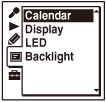
The calendar appears after the “Accessing...” animation, and the current date will be selected.
- Press
 or
or  to select a date, and then press .
The underline is displayed at the date where a recorded file exists.
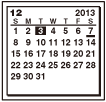
You can move to the previous week or the following week of the date by pressing
 or
or  . When you press and hold each button, you can move continuously through the dates or the weeks.
 - Press or to select a file, and then press .
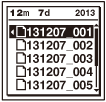
When you press
or to select a file, the file will be played back for confirmation.When you press
to enter the selection, the playback starts. - Press
 STOP to stop playback.
Note
- You need to set the clock in advance to select a recording date from the calendar and play back a file.
- If you specify a date where a recorded file does not exist, “No File” will be displayed. Select a date where a recorded file exists.
- You can search for and play back only the files in the recordable folder that contains files recorded with the IC recorder. For details, see “Structure of folders and files”.
Hint
-
To cancel the selection of a recording date from the calendar and the accompanying playback, press STOP before pressing in step 3.
 Go to Page Top