
IC RecorderICD-SX733/SX734/SX1000
Adjusting the playback speed and tones – the DPC (Digital Pitch Control) and the key control function
You can adjust the playback speed in a range from 0.25 times to 3.00 times. The file is played back in natural tones by means of a digital processing function. Moreover, you can adjust the playback sounds in semitones higher or lower, each in 6 steps. This is useful for practicing songs to recorded accompaniment.
You can also change the playback speed while the “Transcription Playback Mode” is active.
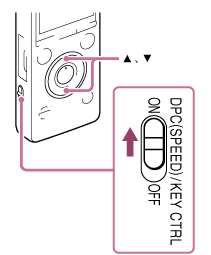
- Slide the DPC (SPEED)/KEY CTRL switch to “ON.”
- During playback, press
 or
or  to enter the DPC setting mode.
 - Press or to adjust the playback speed.
The speed decreases by 0.05 times (from ×0.25 to ×1.00).
The speed increases by 0.10 times (from ×1.00 to ×3.00).
When you press and hold each button, you can change the speed continuously.
The playback speed is set to “×0.70” when you purchase the IC recorder.
- Press
 or
or  to adjust the playback tone (key control).
The playback tone is adjusted by a halftone higher (
 1 - 6).
The playback tone is adjusted by a halftone lower (
 1 - 6).
The playback tone is set to “0” when you purchase the IC recorder.
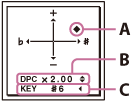
A: Current setting
B: DPC setting
C: Key control setting
- Press
 to exit the setting mode.
Note
- When the playback speed is in a range from 2.10 times to 3.00 times, the noise cut function and the effect function do not work.
- The illustrations used in this Help Guide are based on the ICD-SX1000 model. These illustrations may look different from the model you are using, however, the buttons and controls used for operations are the same.
Hint
- To resume normal playback speed, slide the DPC (SPEED)/KEY CTRL switch to “OFF.”
 Go to Page Top