
IC RecorderICD-SX733/SX734/SX1000
Selecting the memory
You can switch the memory between the built-in memory and a memory card using the folder selection window.
- Press
 (folder).
The folder selection window is displayed.
(folder).
The folder selection window is displayed. - Press
 , and then press
  or
or  to select the
  or
or  tab.
(Built-in memory) or (memory card) tab will appear when you insert a memory card into the IC recorder.
tab.
(Built-in memory) or (memory card) tab will appear when you insert a memory card into the IC recorder. - Press
 .
The memory selection window is displayed.
.
The memory selection window is displayed. - Press or to select “Built-In Memory” or “Memory Card,” and then press .
The tab icon is changed to those of the selected memory,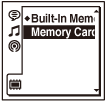 or .
or . - Press
 STOP to return to the stop mode display.
Hint
- You can switch the memory using the menu. Select MENU - the
 tab - “Select Memory” to switch the memory.
 - If the memory card has not been formatted, switch the memory using the “Select Memory” menu, and then select MENU - the tab - “Format” to format the memory card.
 Go to Page Top