
IC RecorderICD-SX733/SX734/SX1000
Adding a new segment to a previously recorded file
When “Add/Overwrite” in the menu is set to “Add,” you can add a new segment to the file being played back. The added segment will be placed after the current file, and will be counted as a part of the file.
Select the file to which you want to add a segment first.
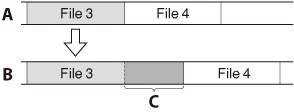
A: During playback of file 3
B: After adding a new segment
C: Added segment
- In the stop mode, select MENU - the
 tab - “Add/Overwrite,” and then press
  .
.
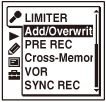
The menu items will be different depending on the model you are using.
- Press
 or
or  to select “Add,” and then press .
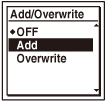
“Add/Overwrite” is set to “OFF” when you purchase the IC recorder.
- Press
 STOP to exit the menu mode.
 - When the file to be added is played back press
 REC/PAUSE.
“Add REC?” will be displayed.
- While “Add REC?” is displayed, press REC/PAUSE.
The recording lamp will turn red.
Then recording starts.
- To stop recording, press STOP.
Note
- You cannot add a segment when the file has reached the maximum size limit (2 GB with LPCM files and 1 GB with MP3 files).
- You cannot add a segment to an LPCM file or an MP3 file that was not recorded using the IC recorder. Moreover, when you edit files using the Sound Organizer software, adding a segment to the files may not be possible.
- The recording mode of an additional recording is the same as the added file.
- If 10 minutes have passed after step 4, you must start the procedure again from step 4.
- The pre-recording function cannot be used together with this function.
- You cannot add a new segment while using the synchronized recording function.
- You cannot add a new segment to a protected file.
 Go to Page Top