
IC RecorderICD-SX733/SX734/SX1000
Recording a few seconds in advance – the pre-recording function
The pre-recording function allows you to record sound sources for approximately 5 seconds prior to the point when you press  REC/PAUSE. This is useful for recording during interviews or when making an open-air recording so that you will not miss an opportunity to start recording.
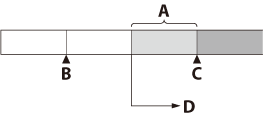
A: Sounds for 5 seconds are buffered in the memory.
B: Press REC/PAUSE to enter the recording standby mode.
C: Press REC/PAUSE.
D: Recording starts.
- In the stop mode, select MENU - the
 tab - “PRE REC,” and then press
  .
.
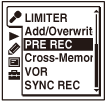
The menu items will be different depending on the model you are using.
- Press
 or
or  to select “ON,” and then press .
“PRE REC” is set to “OFF” when you purchase the IC recorder.
- Press
 STOP to exit the menu mode.
 - Select a folder.
- Press and hold REC/PAUSE.
The IC recorder enters the recording standby mode.
Pre-recording starts and sounds for a maximum of the last 5 seconds are buffered in the memory. (
 shows how long the sound is buffered in the memory.)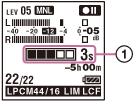
- To start recording, press REC/PAUSE.
The standby for recording mode is released, and recording continues from the sound buffered in step 5.
- To stop recording, press STOP.
Note
- If you start recording with pre-recording function using the built-in microphones, a click noise may be recorded when you press REC/PAUSE. To record with pre-recording function, we recommend using an external microphone.
- When the remaining recordable time is less than 10 seconds, the pre-recording function is disabled. Before using the pre-recording function, erase unwanted files.
- When 60 minutes have passed after the IC recorder entered the standby mode in step 5, the standby mode will be canceled and recording stops.
- If you stop recording before step 6, sounds buffered in the memory will not be saved.
Hint
- To cancel the pre-recording function, set "PRE REC" to “OFF” in step 2.
 Go to Page Top