
IC RecorderICD-SX733/SX734/SX1000
Recording one sound source to two files - the dual-recording function (ICD-SX1000 only)
You can create both LPCM and MP3 files in one recording session.
Note
- If recording the two new files exceeds the maximum number of files that can be saved as a result of the dual recording, the recording will not start.
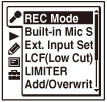
- In the stop mode, select MENU - the
 tab - “REC Mode,” and then press
  .
.
- Press
 or
or  to select “Edit” under “Dual Recording,” and then press .
 - Press or to select “LPCM,” and then press .
- Press or to select the bit rate you want for LPCM, and then press .
When you press
, the previous display appears again. - Press or to select “MP3,” and then press .
- Press or to select the bit rate you want for MP3, and then press .
- Press or to select “Edit Complete,” and then press .
- Press
 STOP to exit the menu mode.
Descriptions of menu items (LPCM)
You can select one of the following bit rates when you select “LPCM.”
LPCM 96kHz/24bit
LPCM (not compressed) in stereo high-quality recording mode
(The sound quality is higher than with LPCM 44.1kHz/16bit mode.)
LPCM 44.1kHz/16bit
LPCM (not compressed) in stereo high-quality recording mode
(The sound quality is equivalent to that of CDs.) (Initial setting)
Descriptions of menu items (MP3)
You can select one of the following bit rates when you select “MP3.”
MP3 320kbps
MP3 (compressed) in stereo high-quality recording mode
(Initial setting)
MP3 192kbps
MP3 (compressed) in stereo standard-quality recording mode
MP3 128kbps
MP3 (compressed) in long play stereo recording mode
MP3 48kbps(MONO)
MP3 (compressed) in monaural standard recording mode
Note
- If either one of the files created exceeds the maximum file size (2 GB for an LPCM file and 1 GB for an MP3 file) during recording, both the LPCM and MP3 files will be divided at the same time.
- The IC recorder adds the same name to both the LPCM and MP3 files at the beginning of the dual recording, however, when the files are divided during recording, different file names may be added to the LPCM and the MP3 files, depending on the file names of the files already stored in the IC recorder.
 Go to Page Top