
IC RecorderICD-SX733/SX734/SX1000
Recording without using the synchronized recording function
You can make music files without using the computer by recording sound/music from other equipment such as a radio cassette recorder, a tape recorder, etc. connected to the IC recorder.
Hint
- If the input level is not strong enough, connect the headphone jack (minijack, stereo) of other equipment to the
 (microphone) jack of the IC recorder and adjust the volume level on the piece of equipment connected to the IC recorder while checking the recording level guide. You can also adjust the input level using the “Sensitivity setting” for “Audio IN” in the “Ext. Input Setting” menu.
- Connect a piece of external equipment (
 ) to the (microphone) jack of the IC recorder when the IC recorder is in the stop mode.
Connect the audio output connector (stereo mini-plug) of other equipment to the
(microphone) jack of the IC recorder using an audio connecting cable (not supplied).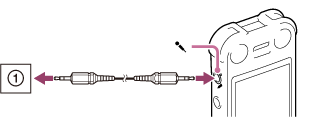
“Ext. Input Setting” appears in the display window.
If “Ext. Input Setting” is not displayed, set it in the menu.
- Press
 or
or  to select “Audio IN,” and then press
  .
“Use SYNC REC Function To Record?” appears on the display.
.
“Use SYNC REC Function To Record?” appears on the display. - Press or to select “No,” and then press .
The synchronized recording is off. (The synchronized recording is set to “OFF” when you purchase the IC recorder.)
- Press
 REC/PAUSE to start recording.
The built-in microphones are automatically cut off and the sound from the connected piece of equipment is recorded.
REC/PAUSE to start recording.
The built-in microphones are automatically cut off and the sound from the connected piece of equipment is recorded. lights up in the display.
 - Start playback on the piece of equipment connected to the IC recorder.
Note
- The illustrations used in this Help Guide are based on the ICD-SX1000 model. These illustrations may look different from the model you are using, however, the buttons and controls used for operations are the same.
Hint
- To stop recording, press
 STOP.
STOP. - You can set “Sensitivity setting” for “Audio IN” in step 2.
 Go to Page Top