
IC RecorderICD-SX733/SX734/SX1000
Turning the backlight on or off (Backlight)
This setting turns the backlight in the display window on or off.
- In the stop mode, select MENU — the
 tab — “Backlight,” and then press
  .
.
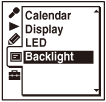
- Press
 or
or  to select the desired menu item, and then press .
 - Press
 STOP to exit the menu mode.
Descriptions of menu items
You can select one of the menu items available.
OFF:
The backlight in the display window does not light, even during operation.
20sec:
The backlight in the display window lights up for approx. 20 seconds.
(Initial settings)
1min:
The backlight in the display window lights up for approx. one minute.
Always-ON:
The backlight in the display window lights up always.
Note
- When you select “Always-ON,” the battery will be consumed quickly.
 Go to Page Top