
IC RecorderICD-SX733/SX734/SX1000
Reducing noise when recording (LCF(Low Cut))
The LCF (Low Cut Filter) function cuts a low frequency to reduce a projector machine sound or roaring noise from wind, etc., therefore you can record a file more clearly.
- In the stop or recording mode, select MENU - the
 tab - “LCF(Low Cut),” and then press
  .
.
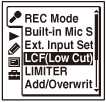
The menu items will be different depending on the model you are using.
- Press
 or
or  to select “ON” or “OFF,” and then press .
 - Press
 STOP to exit the menu mode.
Descriptions of menu items
You can select one of the menu items available.
ON:
The LCF function is activated.
OFF:
The LCF function is canceled.
(Initial setting)
Note
- When the “Ext. Input Setting” menu is set to “Audio IN,” the LCF function does not work.
- You cannot set the LCF function when the Scene Select function has been set. Set the Scene Select function to “Scene Select Off” before setting the LCF function.
 Go to Page Top