
IC RecorderICD-SX733/SX734/SX1000
Adjusting the input level of loud sound automatically (LIMITER)
The LIMITER function adjusts the input level automatically when a sound that is too loud is input, to prevent sound distortion during manual recording.
- In the stop mode, select MENU - the
 tab - “LIMITER,” and then press
  .
.
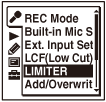
The menu items will be different depending on the model you are using.
- Press
 or
or  to select “ON” or “OFF,” and then press .
 - Press
 STOP to exit the menu mode.
Descriptions of menu items
You can select one of the menu items available.
ON:
The LIMITER function is activated.
(Initial setting)
OFF:
The LIMITER function is canceled.
Note
- When the “Sensitivity setting” item in the “Built-in Mic Setting” or “Ext. Input Setting” is set to “Manual,” the LIMITER function is enabled.
 Go to Page Top