
This function allows you to fast-forward or fast-rewind the playback to search for a particular point and also to use the DPC (Digital Pitch Control) function to slow the playback. This is useful when you want to transcribe a recorded file of a meeting, etc.
- In the stop mode, select MENU - the
 tab - “Transcription Playback Mode,” and then press
  .
.

- Press to start playback.
You can use the following functions while the IC recorder is set to the transcription playback mode.
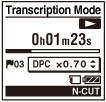
- DPC: You can change the playback speed to make the playback easier for you to understand. Slide the DPC (SPEED)/KEY CTRL switch to “ON,” and press
 or
or  to adjust the playback speed.
 - Easy Search: You can quickly find the desired point in the file by pressing
 /
/ .
. - Cue/Review: You can search for the desired point in the file by pressing and holding /.
- DPC: You can change the playback speed to make the playback easier for you to understand. Slide the DPC (SPEED)/KEY CTRL switch to “ON,” and press
- Press
 STOP to exit the transcription playback mode.
“End Transcription Playback Mode?” appears on the display.
- Press or to select “Yes,” and then press .
Note
- When the duration of time set for the sleep timer has elapsed, the IC recorder will be turned off automatically even when the transcription playback mode is active.
- The following functions or operations cannot be used when the transcription playback mode is active.
- General recording operations
- Sound effect setting (Effect)
- Playback mode
- Selecting a file
- Erasing a file
- Displaying the file list
- A-B repeat function
- Protecting a file
Hint
-
If you enter the menu and select “End Transcription Playback Mode” while the IC recorder is already in the transcription playback mode, a confirmation display asking if you want to end the transcription playback mode appears. Press or to select “Yes,” and then press to end the transcription playback mode.
- When you want to listen to other files, exit the transcription playback mode.
- You can operate the following menu items while the IC recorder is in the transcription playback mode.
- End Transcription Playback Mode
- Noise Cut
- V-UP
- “Set Skip Time” in Easy Search
- Erase Track Mark
- Erase All Track Marks
- Sleep Timer