
Note
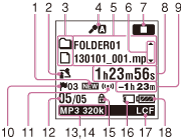
- The window shown above displays indications, numbers or items for explanatory purposes. The actual window may differ from those displayed here.
- Newly arriving podcast indicator
Appears when a new podcast file is transferred from the Sound Organizer software.
- Scene select indicator
Displays the currently selected scene used for recording. Appears when a scene is set.
 : Auto Voice Rec
 : Meeting
 : Lecture
 : Voice Notes
 : Interview
 : Music
 : My Scene 1
 : My Scene 2
 - File information type indicator
 : A folder where you can record a file
 : A folder for playback only
 : A folder for podcast files
 : Title name
 : Artist name
 : File name
 - Sensitivity setting indicator
Displays the level of the Sensitivity setting that has been set in the menu.
 : Auto
 : High
 : Medium
 : Low
: Low : High(Music)
 : Low(Music)
 : Zoom 3
 : Zoom 2
 : Zoom 1
 : Manual
When “Manual” is selected, the recording level also appears.
- File information
Displays the information for each file according to the file information type (folder name, title name, artist name, file name).
- Operating guide for switching file information
You can switch the file information display in sequence by pressing
 or
or  .
. - Operation mode indicator
Displays the following, depending on the current operation of the IC recorder.
 : stop
 - Counter information
You can select the display mode in the menu.
Elapsed Time: The elapsed time of a file
Remain Time: The remaining time of a file
REC Date: Date recorded
REC Time: Time recorded
- Remaining recording time
Displays the remaining recording time in hours, minutes, and seconds. If there is 10 hours and more time remaining, the time is displayed in hours.
If there is 10 minutes and more and less than 10 hours time remaining, the time is displayed in hours and minutes.
If there is less than 10 minutes time remaining, the time is displayed in minutes and seconds.
- Track mark indicator
Displays the track mark number just before the current position. Appears when a track mark is set for a file.
- Alarm indicator
Appears when the alarm is set in a file.
- File number information
The selected file number is displayed in the numerator and the total number of files in the folder is displayed in the denominator.
- Recording mode indicator
The recording mode selected in the menu is displayed.
 (ICD-SX1000 only),
  : LPCM file
 ,
,  ,
,  ,
,  : MP3 file
 ,
,  : LPCM and MP3 files recorded using the Dual recording function (ICD-SX1000 only)
 - Sleep timer indicator
When the sleep timer is set,
 is displayed in the same area of the display as the recording mode. (The sleep timer indicator appears prior to the recording mode indicator.)
 - Protect indicator
Appears when the protection is set for a file.
- Memory card indicator
Appears when “Memory Card” is selected as “Select Memory.” When “Built-In Memory” is selected, no indication is displayed.
- LCF (Low Cut Filter) indicator
Appears when “LCF(Low Cut)” is set to “ON” in the menu.
- Battery indicator