
You can select a folder and a file for recording, playing or editing.
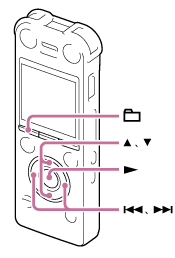
- In the stop mode and the playback mode, press
 (folder).
The folder selection window is displayed.
(folder).
The folder selection window is displayed. - Select a folder.
Press
 or
or  to select the desired folder, and then press
  .
.To display the files contained in the selected folder, press
or to select the folder, and then press  .
.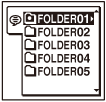
When you purchase the IC recorder, there are 5 folders already available (FOLDER01-05).
- Select a file.
When the file selection window is displayed, press
or to select the desired file, and then press .When the stop mode window is displayed, you can switch files by pressing
 and .
and .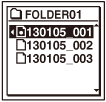
Note
- The illustrations used in this Help Guide are based on the ICD-SX1000 model. These illustrations may look different from the model you are using, however, the buttons and controls used for operations are the same.