
If you connect the supplied stereo headphones to the  (headphones) jack, you can monitor the recording.
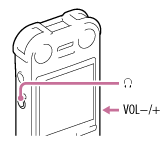
- Connect the supplied stereo headphones to the (headphones) jack.
- Press VOL –/+ to adjust the monitoring volume.
Monitoring volume does not affect to the recording level.
Note
- When the cord of the headphones touches the IC recorder while you are monitoring the recording, the IC recorder may record a rustling noise. The rustling noise can be reduced by holding the cord away from the IC recorder.
- The illustrations used in this Help Guide are based on the ICD-SX1000 model. These illustrations may look different from the model you are using, however, the buttons and controls used for operations are the same.