
The IC recorder has two types of built-in microphones, stereo microphones and a zoom microphone. You can switch these two built-in microphones depending on the recording situation. The built-in microphones can be switched using the menu.
Using the built-in stereo microphones
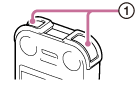

The IC recorder records sound from both the left and the right, using the built-in stereo microphones (L/R) ( ). You can obtain dynamic stereo sound recording. Therefore, using the built-in stereo microphones is recommended for recording a complicated sound source, such as a conference, a musical performance, etc.
Using the built-in zoom microphone
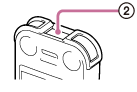

The IC recorder records the sound from the direction you point it out, using the built-in zoom microphone ( ). This is convenient when you want to record a sound source from a particular direction, such as when recording a voice memo, an interview, etc.
When using the built-in zoom microphone, the IC recorder records monaural sound.
Note
- The illustrations used in this Help Guide are based on the ICD-SX1000 model. These illustrations may look different from the model you are using, however, the buttons and controls used for operations are the same.