
When the memory media currently being used becomes full during recording, the IC recorder automatically switches its destination to the other memory media and continues recording (Cross-memory recording).
- Select MENU - the
 tab - “Cross-Memory REC,” and then press
  .
.
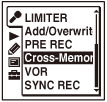
The menu items will be different depending on the model you are using.
- Press
 or
or  to select “ON,” and then press .
“Cross-Memory REC” is set to “OFF” when you purchase the IC recorder.
to select “ON,” and then press .
“Cross-Memory REC” is set to “OFF” when you purchase the IC recorder. - Press
 STOP to exit the menu mode.
When the current memory media becomes full during recording, the “Continue REC in Other Memory” animation appears in the display window. Recording continues as a new file in a recordable folder of the smallest folder number available for the other memory media.
A new file created with a new file name.
Note
-
If the other memory media is also full, a message is displayed and the IC recorder stops recording.
- When you play back the original file recorded with cross-memory recording, the IC recorder does not play the succeeding file automatically.
- Before attempting cross-memory recording, check to see if the IC recorder can switch the memory media to “Memory Card” in advance.
- Cross-memory recording will not work if you insert a memory card into the IC recorder during recording.
- When you are recording files with cross-memory recording, the sound may be partially interrupted after the memory media has been switched.
Hint
- To cancel cross-memory recording, set “Cross-Memory REC” to “OFF” in step 2