
You can set the recording mode for the files to be recorded. Set this menu item before you start recording.
Hint
- You can also record both LPCM and MP3 files at the same time from one source (the dual recording function) (ICD-SX1000 only).
- In the stop mode, select MENU - the
 tab - “REC Mode,” and then press
  .
.
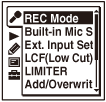
The menu items will be different depending on the model you are using.
- Press
 or
or  to select the desired recording mode, and then press .
 - Press
 STOP to exit the menu mode.
Descriptions of menu items
You can select one of the menu items available.
Dual Recording:
Select the recording mode for both LPCM and MP3.
(ICD-SX1000 only)
LPCM 96kHz/24bit:
LPCM (not compressed) in stereo high-quality recording mode
(The sound quality is higher than with LPCM 44.1kHz/16bit mode)
(ICD-SX1000 only)
LPCM 44.1kHz/16bit:
LPCM (not compressed) in stereo high-quality recording mode
(The sound quality is equivalent to that of CDs.)
MP3 320kbps:
MP3 (compressed) in stereo high-quality recording mode
(Initial setting)
MP3 192kbps:
MP3 (compressed) in stereo standard-quality recording mode
MP3 128kbps:
MP3 (compressed) in long play stereo recording mode
MP3 48kbps(MONO):
MP3 (compressed) in monaural standard recording mode
Note
-
You cannot set “REC Mode” when the Scene Select function has been set. Set the Scene Select function to “Scene Select Off” before setting “REC Mode.”