
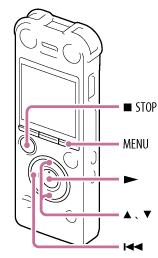
- Press MENU to enter the menu mode.
The menu mode window will be displayed.
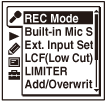
The menu items will be different depending on the model you are using.
- Press
 , press
  or
or  to select the
  ,
,  ,
,  ,
,  , or
, or  tab, and
then press
tab, and
then press  .
. - Press or to select the menu item for which you want to make setting, and then press .
- Press or to select the setting that you want to set, and then press .
- Press
 STOP to exit the menu mode.
Note
- If you do not press any button for 60 seconds, the menu mode is automatically canceled and the window will return to the normal display.
- The illustrations used in this Help Guide are based on the ICD-SX1000 model. These illustrations may look different from the model you are using, however, the buttons and controls used for operations are the same.
Hint
- To return to the previous window, press during menu mode.
- To exit the menu mode, press STOP or MENU.