
You can select the type of external input (“MIC IN” or “Audio IN”) to be recorded and the sensitivity setting when you record from an external device connected to the  (microphone) jack.
- In the stop mode, select MENU - the
 tab - “Ext. Input Setting,” and then press
  .
.
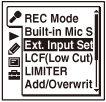
The menu items will be different depending on the model you are using.
- Press
 or
or  to select the item you want to set, and then press .
- If you do not intend to set the input sensitivity:
Select “MIC IN” or “Audio IN.” When you press
, the input type switches. In this case, proceed to step 5 to exit the menu mode. - If you intend to set the input sensitivity:
Select the “Sensitivity setting” item that is displayed under “MIC IN” or “Audio IN.” When you press
, the sensitivity setting display appears. In this case, proceed to the next step.
- If you do not intend to set the input sensitivity:
- Press or to select the item you want to set, and then press .
- If you select “Sensitivity setting” for “MIC IN”:
Select “For Voice,” “For Music,” or “Manual.”
If you select “For Voice” or “For Music,” proceed to the next step.
If you select “Manual,” the setting process is complete.
- If you select “Sensitivity setting” for “Audio IN”:
Select “
 High,” “
 Low,” or “
 Manual.” The setting process is complete.
- If you select “Sensitivity setting” for “MIC IN”:
- Press or to select the sensitivity setting you want, and then press .
- Press
 STOP to exit the menu mode.
Sensitivity settings for “MIC IN”
You can select one of the menu items available.
For Voice:
You can select one of the following items for recording voices.
 Auto: The microphone sensitivity is set automatically to the appropriate recording level for the input sound. (Initial setting)
 High: To record sound far away from the IC recorder or low sound, such as when recording in a spacious room.
 Medium: To record the sound of a normal conversation or meeting, such as when recording in a meeting space or during an interview.
  Low: To record dictation with the microphone held in front of your mouth, sound near the IC recorder, or loud sound.
For Music:
You can select one of the following items for recording music.
- High(Music): To record small groups, for example, a chorus, small (soft) sounds, or a musical instrument that is played some distance away from the IC recorder.
- Low(Music): To record loud sounds, such as that of a band or singing practice.
(Initial setting)
Manual:
During manual recording, you can adjust the recording level manually.
Sensitivity settings for “Audio IN”
You can select one of the menu items available.
High:
Select this when the output level from the connected equipment is too low.
Low:
Select this when the output level from the connected equipment is too high.
Manual:
During manual recording, you can adjust the recording level manually.
(Initial setting)
Note
- You cannot set the microphone sensitivity when the Scene Select function has been set. Set the Scene Select function to “Scene Select Off” before setting the sensitivity.