


Deleting all files in a folder
You can delete all files in the selected folder.
- Select “
 Podcast,” “
 Music,” or “
 Recorded Files” from the HOME menu, and then press
  .
. - Press
 or
or  to select the folder containing the files you want to delete, and then press .
 - Select OPTION - “Delete All Files,” and then press .
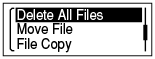
“Delete All Files in This Folder?” appears on the display.
- Press or to select “Yes,” and then press .
The “Please Wait” animation appears in the display window and all files in the selected folder will be deleted.
Note
- You cannot delete a protected file. To delete the file, release the protection first, and then delete the file.
Hint
- To cancel deleting, select “No” in step 4, and then press .