
IC RecorderICD-UX532/UX533/UX533F/UX534F
Using the menu
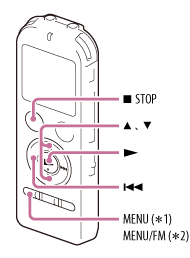
*1 ICD-UX532/UX533
*2 ICD-UX533F/UX534F
- Press MENU (ICD-UX532/UX533 only) or MENU/FM (ICD-UX533F/UX534F only) to enter the menu mode.
The menu mode window will be displayed.
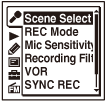
- Press
 , press
  or
or  to select the
  ,
,  ,
,  ,
,  ,
,  , or
, or  tab, and
then press
tab, and
then press  .
. - Press or to select the menu item for which you want to make setting, and then press .
- Press or to select the setting that you want to set, and then press .
- Press
 STOP to exit the menu mode.
Note
- If you do not press any button for 60 seconds, the menu mode is automatically canceled and the window will return to the normal display.
Hint
- To return to the previous window, press during menu mode.
- To exit the menu mode, press STOP or MENU.
 Go to Page Top