
IC RecorderICD-UX532/UX533/UX533F/UX534F
Moving a file to a different folder
Moves the selected file to the selected folder.
- Select the file you want to move.
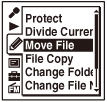
- In the stop mode, select MENU - the
 tab -
“Move File,” and then press
tab -
“Move File,” and then press  .
.
- Press
 , press
  or
or  to select the
  tab or the
  tab, and then press .
 - Press or to select the folder that you want to move the file into, and then press .
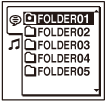
“Moving File...” animation appears and the file is moved to the last position in the destination folder.
When you move a file to another folder, the original file in the previous folder will be erased.
- Press
 STOP to exit the menu mode.
Note
- You cannot move a protected file. To move the file, release the protection first, and then move the file.
- You cannot move podcast files.
Hint
- To cancel moving the file, press STOP before step 4.
 Go to Page Top