
IC RecorderICD-UX532/UX533/UX533F/UX534F
Using the sleep timer (Sleep Timer)
If you set the sleep timer, the IC recorder will turn off automatically when the duration of time set for the sleep timer has elapsed.
- Select MENU - the
 tab - “Sleep Timer,” and then press
  .
.
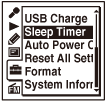
- Press
 or
or  to select the desired time duration, and then press .
You can select from “15min,” “30min,” “60min,” “90min,” “120min,” or “OFF.”
- Press
 STOP to exit the menu mode.
When you set the sleep timer, “
 ” appears on the display.
Note
- When “Auto Power Off” is set in the menu, the power of the IC recorder may turn off before the duration of time set for the sleep timer has elapsed.
- When the duration of time set for the sleep timer has elapsed, the IC recorder will turn off even when it is recording, or receiving/recording an FM radio broadcast.
Hint
- To cancel the sleep timer setting, select “OFF” (initial setting).
- To check the remaining time before the sleep timer activates, perform step 1 again. If you want to keep the setting, select “Stay On.”
 Go to Page Top