


Formatting the memory (Format)
You can format the memory media currently selected (the built-in memory or the memory card), erasing all the data in the memory and resetting the folder structure to its default status.
- Select the memory you want to format.
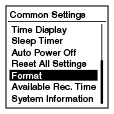
- In the recording stop or playback stop mode, select BACK/HOME - “
 Settings” - “Common Settings” - “Format,” and then press
  .
.
“Erase All Data?” appears.
- Press
 or
or  to select “Yes,” and then press .
The “Please Wait” animation appears and the memory media will be formatted.
to select “Yes,” and then press .
The “Please Wait” animation appears and the memory media will be formatted. - Press and hold BACK/HOME to return to the HOME menu.
Press
 STOP to return to the window displayed before you entered the HOME menu.
Note
-
Use the IC recorder formatting function to format the memory media.
Do not use your computer to format the media.
- If you format the built-in memory, all data stored there will be erased. (Protected files and the Help Guide will also be erased.) Note that once the files are erased, you cannot retrieve them.
Hint
- To cancel formatting the memory media, select “No” in step 3.