


Switching the FM radio output between speaker and headphones
During receiving or recording an FM broadcast, you can switch between the sound from the speaker and the sound from the headphones using the menu.
- In the FM radio reception or recording mode, select OPTION - “Audio Output,” and then press
 .
.
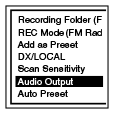
- Press
 or
or  to select “Headphones” or “Speaker,” and then press .
Description of menu items
You can select one of the menu items available.
Headphones:
The sound comes out from the headphones.
(Initial setting)
Speaker:
The sound comes out from the speaker(s).