


Playing back the recorded sound
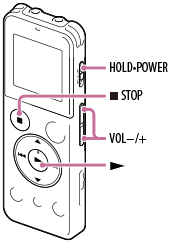
- Select the desired file to be played back from the HOME menu.
- Press
 .
Playback starts, and the operation indicator will light in green.
.
Playback starts, and the operation indicator will light in green. - Press VOL –/+ to adjust the volume.
Hint
- Press
 STOP to stop playback.
- After you stop recording, you can playback the file just recorded by pressing in the recording stop window.