


选择内存
您可以在内置内存和存储卡之间切换内存。
- 在停止模式下,选择BACK/HOME - “
 Settings” - “Common Settings” - “Select Memory”,然后按
 。
。
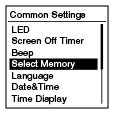
- 按
 或
或 选择“Built-In Memory”或“Memory Card”,然后按。
- 按住BACK/HOME返回到HOME菜单。
按
 STOP返回到进入HOME菜单之前显示的窗口。
注意
- 如果当前未在IC录音机中插入存储卡,则将自动选择内置内存。
提示
- 如果尚未格式化存储卡,请使用“Select Memory”菜单切换内存,然后选择BACK/HOME - “ Settings” - “Common Settings” - “Format”格式化存储卡。