- Top Page
- >
- Home
- >
- Using the Home Menu
Using the Home Menu
You can access various content or applications from the Home menu.
To access the Home screen
Press  (HOME).
About the Home screen
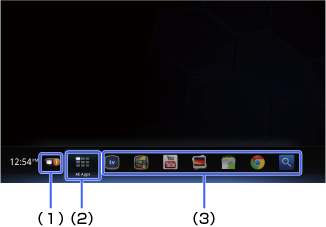
(1) Notifications
Press ENTER to display information about downloading applications, software updates, etc.
(2) All Apps
Press ENTER to display all applications. For details, see Accessing All Applications.
(3) Applications (shortcuts)
Select one to launch an application.
Tips
- You can add widgets to the Home screen. For details, see Adding Widgets.
- Applications displayed on the Home screen are shortcuts. You can add applications to or remove unused applications from the Home screen. If you want to display all applications, select [All Apps].
Changing the wallpaper
You can select a wallpaper pattern.
1. Press
 (MENU) when the Home screen is displayed.
2. Select [Home and All Apps settings] - [Wallpaper].
3. Select a wallpaper pattern.
[Live Wallpaper] changes the pictures displayed one after another, as time goes by.
[Photos] allows you to select any photo registered in the Photos application.