- Top Page
- >
- Playback
- >
- Playing a Disc
Playing a Disc
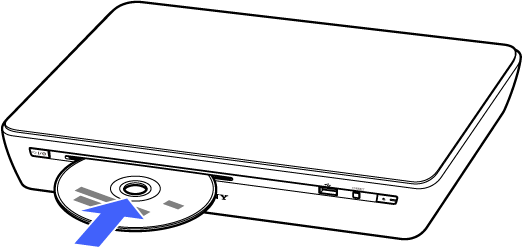
Insert a disc into the disc slot.
Playback starts automatically. Or press  (PLAY).
If playback does not start automatically or you have quit Disc Player, press  (HOME) and select [Applications] - [Disc Player].
Note
- If playback does not start, see Playable Discs. If the problem persists see NSZ-GT1 in Troubleshooting/FAQ.
Keys available during playback
-
- (PLAY):
- Starts or re-starts playback. You can resume playback from the resume point.
-
 (PAUSE):
- Pauses or re-starts playback.
-
 (STOP):
- Stops playback and remembers the stop point (resume point).
-
 /
/  (FR/FF):
- Fast rewinds / Fast forwards the disc.
For video playback only: The search speed changes each time you press the button during playback. When you press (FF) in pause mode, the video plays one frame at a time.
-
 /
/  (PREV/NEXT):
- Skips to the previous / next chapter (video playback), to the beginning of the current track or next track (music playback). To go to the previous track, press (PREV) twice (music playback).
To eject a disc
Press  (EJECT) on the unit, or press Fn + 0 on the Keypad.
Note
- If you cannot eject the disc when pressing (EJECT), press
 (on/standby) button to turn off the unit, then press (EJECT).
To display the BD's or DVD's Top Menu
Press Fn + GUIDE (TOP MENU). To close the Top Menu, press Fn + GUIDE again.
To display the BD-ROM's Pop-up Menu or DVD's menu
Press Fn + DVR (POP UP/MENU). To close the menu, press Fn + DVR again.
To switch the language track
When multilingual tracks are recorded on BD-ROMs/DVD VIDEOs, press Fn + 2 (AUDIO) repeatedly.
To select a music track on a CD
Press Fn + 2 (AUDIO) repeatedly.
To switch the subtitle language
When multilingual subtitles are recorded on BD-ROMs/DVD VIDEOs, press Fn + 3 (CC (Subtitle)) repeatedly.
Displaying the play information
Press Fn + 4 (INFO) to check the playback information, etc.
The displayed information differs depending on the disc type and player status.
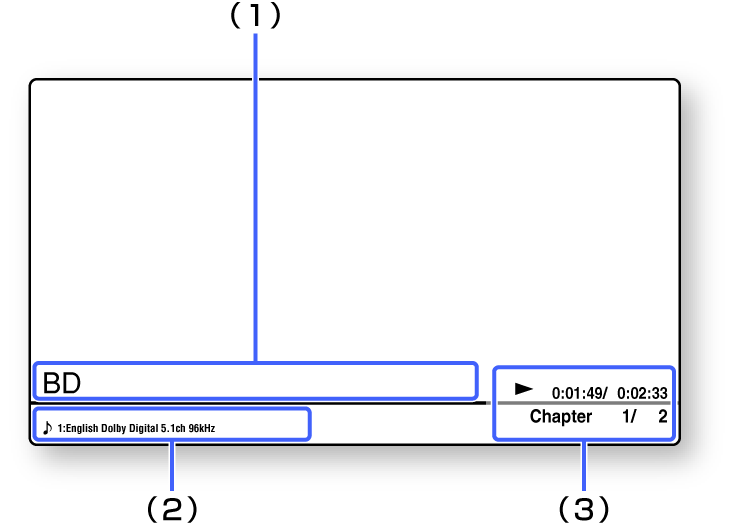
(1) Title/Cover Art area
(2) Video/Audio Information area
Displays the selected subtitle, angle, audio setting, and available functions.
(3) Playback Information area
Displays the play mode, repeat type, elapsed time/total time, and chapter number.

Java and all Java-based trademarks and logos are trademarks or registered trademarks of Oracle and/or its affiliates. Other names may be trademarks of their respective owners.