
 Contents list
Location and function of parts
Functions of buttons, indicators, and other parts on your wireless stereo headset are explained here.
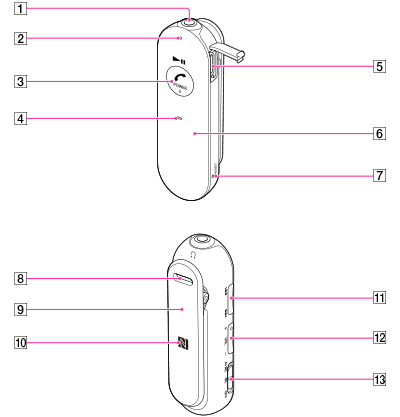
-
Stereo mini jack
-
Indicator
Lights up in red or blue to indicate the power or communication status of the headset.
-
 POWER (
 ) (play/pause) button
Controls various call and playback functions.
-
Microphone
-
Micro-USB port [Details]
Connect a computer to this port with the supplied micro-USB cable to charge the headset.
-
Built-in antenna
The BLUETOOTH antenna is built into the headset.
-
RESET button [Details]
Press the button with a pointing object, such as a pin, to reset the headset.
-
Strap hole
-
Clip
-
N mark [Details]
-
 /
/ buttons
Controls various functions when listening to music.
-
VOL (volume) +/– buttons
The + button has a tactile dot.
-
Noise canceling switch
