Contents list
Connecting with a paired iPhone
-
Turn on the headset.
Press and hold the  POWER button for about 2 seconds.
POWER button for about 2 seconds.
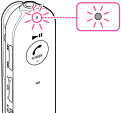
Make sure that the indicator (blue) flashes after you release the button.
-
If the iPhone was connected with the headset the last time, an HFP/HSP connection is made when you turn on both devices. To make an A2DP connection (music playback), press the
POWER ( ) button again.
-
Check the connecting status on the iPhone. If not connected, proceed to step 2.
-
Make the BLUETOOTH connection from the iPhone.
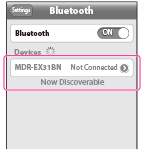
Touch [Settings]  [Bluetooth]. Make sure that [ON] is selected, then touch [MDR-EX31BN].
[Bluetooth]. Make sure that [ON] is selected, then touch [MDR-EX31BN].