
 Contents list
Listening to music
-
A2DP (Advanced Audio Distribution Profile): enables you to enjoy high-quality audio content wirelessly.
-
AVRCP (Audio Video Remote Control Profile): enables you to enjoy basic remote control operation (play, stop, etc.) of a BLUETOOTH device.
-
Connect the headset with a BLUETOOTH device.
-
Connect the headphones supplied.

-
Clip the headset to a pocket, etc., of your clothes and then wear the headphones.
 in your left ear, and the one marked
  in your right ear. The side has a tactile dot.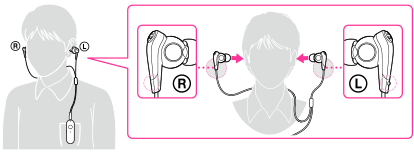
-
You can attach a strap (sold separately) to the headset through the strap hole.
-
Play back music or video on the BLUETOOTH device.
-
Depending on the BLUETOOTH device, it may be necessary to adjust the volume or set the audio output setting on the connected device.
After use
-
Terminate the BLUETOOTH connection by operating the BLUETOOTH device.
-
Press and hold the
 POWER button for about 2 seconds.
-
When you finish playing music, the BLUETOOTH connection may terminate automatically, depending on the BLUETOOTH device.
Changing the earbuds
 |
 |
 |
 |
|
SS (Red)
(sold separately)
|
S (Orange)
(supplied)
|
M (Green)
(supplied)
|
L (Light blue)
(supplied)
|
To detach an earbud
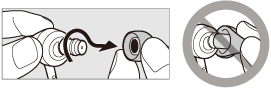
To attach an earbud

