
 Contents list
Using the noise canceling
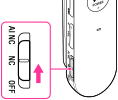
-
The noise canceling circuit actually senses outside noise with built-in microphones and sends an equal-but-opposite canceling signal to the headset.
-
The noise canceling effect may not be pronounced in a very quiet environment, or some noise may be heard.
-
The noise canceling effect may vary depending on how you wear the headset.
-
The noise canceling function works for noise in the low frequency band primarily. Although noise is reduced, it is not canceled completely.
-
When you use the headset in a train or a car, noise may occur depending on street conditions.
-
Mobile phones may cause interference and noise. Should this occur, locate the headset further away from the mobile phone.
-
Do not cover the microphones of the headphones with your hands. The noise canceling function may not work properly.

-
Microphone of headphones
-
You can also use other headphones than the ones supplied with this headset. When you use headphones not supplied with the headset, the noise canceling function may not work as efficiently as it is designed. If you use any headphones not supplied with this headset, set the noise canceling switch to OFF.
