
 Contents list
Using the AI noise canceling
AI Noise Canceling is a useful function that automatically selects one of the noise canceling modes. This function provides the most effective noise canceling mode by immediately analyzing ambient sound components when the noise canceling switch is slid to the AI NC side.
Slide the noise canceling switch to the AI NC side.
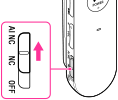
When the headset is on, keep the noise canceling switch to the AI NC side until beep sounds come from the headphones. The headset starts analyzing ambient sound components (about. 3 seconds).
During analysis, sound volume from the headphones is lowered and the indicator blinks.
When analysis is completed, the most effective noise canceling mode is set automatically, and sound volume from the headphones returns to the normal.
Noise canceling mode types
|
NC Mode A
|
Reduces noise containing a large amount of middle to low frequency sounds. Ambient noise in the environment is effectively reduced.
|
|
NC Mode B
|
Reduces noise containing a large amount of super low frequency sounds. For example, background noise heard mainly on a bus or a train is effectively reduced.
|
|
NC Mode C
|
Reduces noise of relatively quiet and wide range of frequency sounds. Background noise mainly present in an office environment (PCs, copiers, etc.) is effectively reduced.
|
Note
-
The noise canceling mode returns to NC Mode B when:
-
the noise canceling switch is set to OFF, then to NC again.
-
the headset is turned off, then turned on again.
