
 Contents list
Controlling the audio device
If the BLUETOOTH device supports AVRCP, you can control it by the buttons on the headset. The functions available may vary depending on the BLUETOOTH device. Refer to the manual supplied with your BLUETOOTH device.
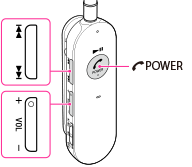
To play/pause
Press the  POWER (
 ) button.
POWER () button.To adjust the volume
Press the VOL +/– button.
To skip to the next/previous song
Press the  /
/ button.
/ button.To fast-forward/fast-reverse
Press and hold the / button.
/ button. Note
-
If the communication condition is poor, the BLUETOOTH device may react incorrectly to the operation on the headset.