


Connecting to a computer
Connect a USB port of your computer to the  (USB) port on the rear panel of the USB DAC AMPLIFIER using the USB cable (supplied), then start up your computer.
Note
- Make sure that the USB DAC AMPLIFIER is turned off when you connect a USB cable.
- When a signal of a format not supported is input, the USB REAR lamp flashes. Inputting such a signal may produce noise or even damage the speakers or headphones if played at a high volume.
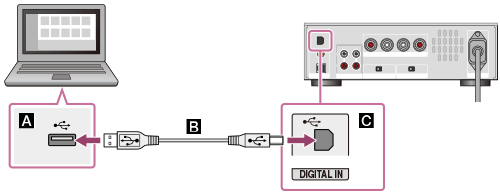
 : USB port of a computer
 : USB cable (supplied)
 : (USB) port of the USB DAC AMPLIFIER