Unable to operate the system
 |
Check that this system is turned on.
|
 |
If the POWER/HOLD switch is set to HOLD, slide it to the center. [Details]
|
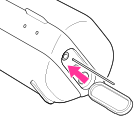
When you cannot operate the system even if the system is turned on, press the RESET button on the left side of the system with a thin object like a small pin. Then turn on the system following the correct procedure. If the system does not restart, consult your nearest Sony dealer.