


وحدة التحكم عن بعد التي تعمل بالأشعة تحت الحمراء (IR)
تختلف وحدة التحكم عن بُعد المرفقة، وكذلك تصميم الأزرار وأسماء الأزرار، تبعًا لنوع الموديل/البلد/المنطقة الخاصة بك.
الأزرار العليا بوحدة التحكم عن بُعد
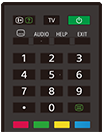
 (الكشف عن المعلومات/النص)
عرض المعلومات.
TV
انتقال إلى قناة تلفزيون، أو مصدر إدخال، وعرض قائمة التلفزيون. لمعرفة التفاصيل، يُرجى الرجوع إلى صفحة استخدام قائمة التلفزيون .
 (تشغيل)
للتشغيل على وضع الاستعداد/وضع الاستعداد المتصل بالشبكة أو التحويل إليه.
 (إعداد الترجمة المكتوبة)
تشغيل الترجمات المكتوبة أو إيقافها (عندما تكون الميزة متاحة).
AUDIO
تحديد الصوت الخاص بالمصدر متعدد اللغات أو الصوت المزدوج للبرنامج الذي يتم عرضه حاليًا (اعتمادًا على مصدر البرنامج).
HELP
عرض قائمة التعليمات. يمكن الوصول إلى دليل المساعدة من هنا.
EXIT
عودة إلى الشاشة السابقة أو الخروج من القائمة. عندما تكون خدمة التطبيق التفاعلي متاحة، اضغط للخروج من الخدمة.
زر الأرقام/・(نقطة)
استخدمه مع الأزرار 0-9 لتحديد القنوات الرقمية.
 (النص)
عرض المعلومات النصية.
الأزرار الملونة
تنفيذ الوظيفة المطابقة في ذلك الوقت.
الأزرار السفلية بوحدة التحكم عن بُعد
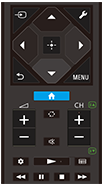
 (تحديد الإدخال)
عرض مصدر الإدخال وتحديده، وما إلى ذلك. للتفاصيل، ارجع إلى صفحة تحديد مصادر الإدخال.
 (الإعدادات السريعة)
عرض الإعدادات السريعة. لمعرفة التفاصيل، يُرجى الرجوع إلى صفحة استخدام الإعدادات السريعة .
 (أعلى) /
 (أسفل) /
 (يسار) /
 (يمين) /
 (إدخال) (لوحة توجيهية للتنقل)
قائمة على الشاشة للتنقل والتحديد.
 (الرجوع)
عودة إلى الشاشة السابقة.
 (القائمة الرئيسية)
عرض القائمة الرئيسية للتلفزيون. لمعرفة التفاصيل، يُرجى الرجوع إلى صفحة القائمة الرئيسية.
MENU
اعرض قائمة على التلفزيون لاستخدام وظائف الأزرار غير الموجودة في وحدة التحكم عن بُعد على الشاشة.
 +/- (مستوى الصوت)
ضبط مستوى الصوت.
 (الانتقال)
الانتقال للخلف وللأمام بين قناتين أو مصدري إدخال. يعمل التلفزيون على التبديل بين القناة الحالية أو مصدر الإدخال الحالي وآخر قناة أو مصدر إدخال تم تحديده.
 (كتم الصوت)
كتم الصوت. اضغط مرة أخرى لاستعادة الصوت.
تلميح
- يُمكن تشغيل خدمة اختصارات إمكانية الوصول أو إيقاف تشغيلها عن طريق الضغط مع الاستمرار على
(كتم الصوت) لمدة 3 ثوانٍ.
CH +/- (القناة)
في وضع التلفزيون: حدد القناة.
في وضع النص: حدد الصفحة
 (التالية) أو
 (السابقة).
 (لوحة البيانات)
عرض لوحة البيانات.
 (التشغيل) /
 (الإرجاع السريع) /
 (الإيقاف المؤقت) /
 (الإيقاف) /
 (التقديم السريع)
تشغيل محتويات الوسائط على التلفزيون وجهاز BRAVIA Sync المتوافق المتصل.
 (الدليل)
عرض دليل البرنامج الرقمي للتلفزيون أو لجهاز صندوق التلفزيون. لمعرفة التفاصيل، يُرجى الرجوع إلى صفحة استخدام دليل البرامج.
لإغلاق هذه الشاشة والإنتقال الى شاشة الإعدادات، الرجاء اختيار الرابط التالي.
 انتقل إلى شاشة الإعدادات
كيفية كتم صوت تشغيل جهاز التحكم عن بُعد
-
اضغط على الزر
(الإعدادات السريعة) على جهاز التحكم عن بُعد، ثمَّ حدد ما يلي لتعطيلها.[الإعدادات] — [النظام] — [أصوات النظام]
معلومات عن استبدال بطارية جهاز التحكم عن بُعد
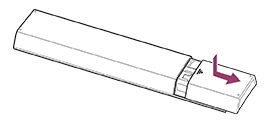
- افتح غطاء جهاز التحكم عن بُعد كما هو موضح أدناه.
- قم بإزالة غطاء وحدة التحكم عن بُعد واستبدال البطاريات بأخرى جديدة.
- تحقق من أن اتجاه كل بطارية يتطابق مع الرمز الموجب (+) والرمز السالب (-) الموجودين في حجيرة البطارية.
-
نوع السحب
-