


Infračervené dálkové ovládání
Dodané dálkové ovládání a také uspořádání tlačítek a názvy tlačítek se liší v závislosti na modelu/zemi/oblasti.
Horní tlačítka na dálkovém ovládání
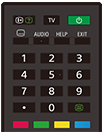
 (Informace/zobrazení textu)
Zobrazí informace.
TV
Přepne na televizní kanál nebo vstup a zobrazí funkci TV nabídka. Podrobnosti zjistíte na stránce Použití funkce TV nabídka .
 (Napájení)
Zapíná nebo přepíná pohotovostní / síťový pohotovostní režim.
 (Nastavení titulků)
Zapne či vypne titulky (když je tato funkce dostupná).
AUDIO
Zvolí zvuk vícejazyčného zdroje nebo duální zvuk aktuálně sledovaného programu (závisí na zdroji programu).
HELP
Zobrazí nabídku nápovědy. Odtud získáte přístup k Uživatelská příručka.
EXIT
Zobrazí předchozí obrazovku nebo zavře nabídku. Pokud je k dispozici služba interaktivních aplikací, stisknutím tuto službu ukončíte.
Číselná tlačítka /・(tečka)
Použijte společně s tlačítky 0–9 k volbě digitálních kanálů.
 (Text)
Zobrazí textové informace.
Barevná tlačítka
Provádí příslušnou funkci.
Dolní tlačítka na dálkovém ovládání
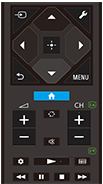
 (Výběr vstupu)
Zobrazí a vybere vstupní zdroj atd. Podrobnosti naleznete na stránce Volba vstupů.
 (Rychlá nastavení)
Zobrazit Rychlá nastavení. Podrobnosti zjistíte na stránce Použití funkce Rychlá nastavení .
 (Nahoru) /
 (Dolů) /
 (Vlevo) /
 (Vpravo) /
 (Zadat) (Navigační tlačítka)
Slouží k navigaci v rámci nabídek na obrazovce a k volbě položek.
 (ZPĚT)
Zobrazí předchozí obrazovku.
 (DOMŮ)
Zobrazí nabídku Home televizoru. Podrobnosti zjistíte na stránce Nabídka Home.
MENU
Zobrazí na obrazovce televizoru nabídku funkčních tlačítek, která nemáte na dálkovém ovládání.
 +/- (Hlasitost)
Nastavuje hlasitost.
 (Přeskočit)
Slouží k přepínání mezi dvěma kanály nebo vstupy. Televizor se bude přepínat mezi aktuálním kanálem nebo vstupem a naposledy vybraným kanálem nebo vstupem.
 (Ztlumit)
Ztlumí zvuk. Opětovným stisknutím zvuk obnovíte.
Tip
- Službu přístupnosti lze zapnout a vypnout podržením tlačítka
(Ztlumit) po dobu 3 sekund.
CH +/- (Kanál)
V televizním režimu: Zvolí kanál.
V textovém režimu: Zvolí
 (Další) nebo
 (Předchozí) stránku.
 (Panel)
Zobrazit Panel.
 (Přehrát) /
 (Rychle zpět) /
 (Pozastavit) /
 (Zastavit) /
 (Rychle vpřed)
Ovládá multimediální obsah v televizoru a připojeném zařízení, které je kompatibilní s funkcí BRAVIA Sync.
 (Průvodce)
Zobrazí průvodce digitálními programy pro televizor nebo kabelový/satelitní přijímač. Podrobnosti zjistíte na stránce Použití programového průvodce.
Pro zavření této obrazovky a přechod na obrazovku Nastavení zvolte následující odkaz.
 Přejděte na obrazovku Nastavení
Jak ztlumit zvuk dálkového ovládání
-
Stiskněte tlačítko
(Rychlá nastavení) na dálkovém ovládání a proveďte následující kroky, abyste jej deaktivovali.[Nastavení] — [Systém] — [Systémové zvuky]
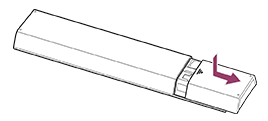
Informace o výměně baterie dálkového ovládání
- Otevřete kryt dálkového ovládání podle obrázku níže.
- Sejměte kryt dálkového ovládání a vyměňte baterie za nové.
- Zkontrolujte, zda orientace všech baterií odpovídá symbolům kladného (+) a záporného (-) pólu v prostoru na baterie.
-
Nasunovací typ
-