


IR-Fernbedienung
Die mitgelieferte Fernbedienung und das Layout der Tasten und Tastennamen können je nach Modell/Land/Region unterschiedlich sein.
Obere Tasten auf der Fernbedienung
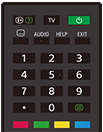
 (Info/Text-Anzeige)
Anzeigen von Informationen.
TV
Wechseln zu einem Fernsehkanal oder Eingang und Anzeigen vom TV-Menü. Näheres erfahren Sie auf der Seite TV-Menü verwenden.
 (Power)
Schaltet ein oder schaltet in Standby-/Netzwerk-Standby-Modus um.
 (Untertiteleinstellung)
Ein- oder Ausschalten der Untertitel (sofern die Funktion verfügbar ist).
AUDIO
Auswählen des mehrsprachigen Tons oder Dual-Ton für die Sendung, die Sie gerade anschauen (je nach der Programmquelle).
HELP
Anzeigen des Hilfe-Menüs. Die Hilfe kann von hier aus aufgerufen werden.
EXIT
Zurückkehren zum vorherigen Bildschirm oder Beenden des Menüs. Wenn ein interaktiver Anwendungsdienst verfügbar ist, drücken Sie diese Taste, um den Dienst zu schließen.
Zahlentaste/・(Punkt)
Mit den Tasten 0-9 können Sie die digitalen Kanäle auswählen.
 (Text)
Anzeigen von Textinformationen.
Farbtasten
Zum Ausführen der entsprechenden Funktion für diesen Zeitpunkt.
Untere Tasten auf der Fernbedienung
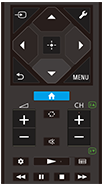
 (Auswahl der Eingangsquelle)
Zum Anzeigen und Auswählen der Eingangsquelle usw. Näheres erfahren Sie auf der Seite Auswählen der Eingänge.
 (Schnelleinstellungen)
Schnelleinstellungen anzeigen. Näheres erfahren Sie auf der Seite Schnelleinstellungen verwenden.
 (Oben) /
 (Unten) /
 (Links) /
 (Rechts) /
 (Eingabe) (Navigations-D-Pad)
Menünavigation und -auswahl auf dem Bildschirm.
 (ZURÜCK)
Wechseln zum vorherigen Bildschirm.
 (ZUHAUSE)
Anzeigen des Home-Menüs des Fernsehgeräts. Näheres erfahren Sie auf der Seite Home-Menü.
MENU
Ruft ein Menü am Fernsehgerät auf, so dass Funktionen, deren Tasten sich nicht auf der Fernbedienung befinden, am Bildschirm bedient werden können.
 +/- (Lautstärke)
Einstellen der Lautstärke.
 (Wechseln)
Wechseln zwischen zwei Kanälen oder Eingangsquellen. Das Fernsehgerät wechselt zwischen dem aktuellen Kanal oder der aktuellen Eingangsquelle und dem/der zuletzt ausgewählten Kanal oder Eingangsquelle.
 (Stummschaltung)
Stummschalten des Tons. Drücken Sie erneut, um den Ton wieder einzuschalten.
Tipp
- Sie können die Kurzbefehlsfunktion für Barrierefreiheit aktivieren oder deaktivieren, indem Sie
(Stummschaltung) 3 Sekunden lang gedrückt halten.
CH +/- (Kanal)
Im Fernsehmodus: Auswählen des Kanals.
Im Textmodus: Auswählen der
 (nächsten) oder
 (vorherigen) Seite.
 (Dashboard)
Dashboard anzeigen.
 (Wiedergabe) /
 (Zurückspulen) /
 (Pause) /
 (Stopp) /
 (Vorspulen)
Bedienung der Medieninhalte auf dem Fernsehgerät und im angeschlossenen BRAVIA Sync-kompatiblen Gerät.
 (Programmführer)
Zeigt den digitalen Programmführer des Fernsehgeräts oder der TV-Box an. Näheres erfahren Sie auf der Seite Verwenden des Programmführers.
Um diesen Bildschirm zu schließen und zum Bildschirm Einstellungen zu springen, wählen Sie den folgenden Link.
 Zum Bildschirm Einstellungen springen
So schalten Sie den Quittungston der Fernbedienung aus
-
Drücken Sie die Taste
(Schnelleinstellungen) auf der Fernbedienung und wählen Sie der Reihe nach Folgendes, um sie zu deaktivieren.[Einstellungen] — [System] — [Systemtöne]
Zum Austausch der Batterie der Fernbedienung
- Öffnen Sie die Abdeckung der Fernbedienung, wie unten gezeigt.
- Entfernen Sie die Abdeckung der Fernbedienung und tauschen Sie die Batterien gegen neue aus.
- Vergewissern Sie sich, dass die Batterien gemäß den Symbolen für den positiven (+) und negativen (-) Pol im Batteriefach polaritätsrichtig eingelegt sind.
-
Schiebbare Abdeckung

-