


Adjusting home network settings
To close this screen and jump to the Settings screen, select the following link.
 Jump to the Settings screen
You can adjust the following home network settings.
To connect to a server
Connect the client device (TV) and the server device (BD/DVD recorder) to the same network.
To register the TV as a client device on the server, refer to the server device manual.
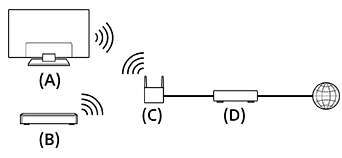
(A) TV
(B) BD/DVD recorder
(C) Wireless LAN router
(D) Modem
To check the server connection
Press the
 (Quick Settings) button on the remote control, then select [Settings] — [Network and Internet] — [Home network setup] — [Server diagnostics] — follow the on-screen instructions to perform diagnostics.
To use the remote device
Press the
(Quick Settings) button on the remote control, then select [Settings] — [Network and Internet] — [Remote device settings] — the desired option.
[Control remotely]
Enable operation of the TV from a registered device.