


Mando a distancia por infrarrojos
El mando a distancia incluido, así como la distribución de los botones y sus nombres, varían según el modelo, país o región.
Botones superiores del mando a distancia
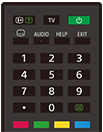
 (Mostrar información/texto)
Información de visualización.
TV
Cambia a un canal de televisión o a una entrada y muestra el Menú del TV. Para obtener información detallada, consulte la página Uso del Menú del TV .
 (Encendido)
Enciende el televisor o lo cambia al modo de espera/espera en red.
 (Ajuste de subtítulo)
Activa o desactiva los subtítulos (cuando la función está disponible).
AUDIO
Selecciona el sonido de la fuente multilingüe o el sonido dual del programa que se está viendo en ese momento (dependiendo de la fuente del programa).
HELP
Muestra el menú Ayuda. Desde aquí se puede acceder a la Guía de ayuda.
EXIT
Vuelve a la pantalla anterior o sale del menú. Cuando hay disponible un servicio de aplicación interactiva, púlselo para salir del servicio.
Botón de número/・(Punto)
Utilice los botones 0-9 para seleccionar canales digitales.
 (Texto)
Muestra la información de teletexto.
Botones de color
Realiza la función correspondiente en cada momento.
Botones inferiores del mando a distancia
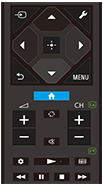
 (Selección de entrada)
Muestra y selecciona la fuente de entrada, etc. Para obtener información detallada, consulte la página Selección de entradas.
 (Configuración rápida)
Muestra los Configuración rápida. Para obtener información detallada, consulte la página Uso del Configuración rápida .
 (Arriba) /
 (Abajo) /
 (Izquierda) /
 (Derecha) /
 (Intro) (D-Pad de navegación)
Navegación y selección de los menús en pantalla.
 (ATRÁS)
Vuelve a la pantalla anterior.
 (INICIO)
Muestra el menú Inicio del televisor. Para obtener información detallada, consulte la página Menú Inicio.
MENU
Muestra un menú en el televisor para usar las funciones de los botones que no están en el mando a distancia en la pantalla.
 +/- (Volumen)
Ajusta el volumen.
 (Saltar)
Alterna entre dos canales o entradas. El televisor alterna entre el canal o entrada actual y el último canal o entrada que se seleccionó.
 (Silencio)
Silencia el sonido. Púlselo otra vez para volver a activar el sonido.
Sugerencia
- El servicio rápido de accesibilidad puede activarse o desactivarse manteniendo pulsado el botón
(Silencio) durante 3 segundos.
CH +/- (Canal)
En modo de televisor: selecciona el canal.
En modo de teletexto: selecciona la página
 (Siguiente) o
 (Anterior).
 (Panel de control)
Muestra los Panel de control.
 (Reproducción) /
 (Retroceso rápido) /
 (Pausa) /
 (Detener) /
 (Avance rápido)
Controla el contenido multimedia del televisor y de dispositivos compatibles BRAVIA Sync conectados.
 (Guía)
Muestra la guía de programas digital del televisor o del receptor de cable/satélite. Para obtener información detallada, consulte la página Uso de la guía de programas.
Para cerrar esta pantalla e ir a la pantalla Ajustes, seleccione el siguiente enlace.
 Ir a la pantalla Ajustes
Cómo silenciar el sonido de funcionamiento del mando a distancia
-
Pulse el botón
(Configuración rápida) del mando a distancia y seleccione las siguientes opciones para desactivarlas.[Ajustes] — [Sistema] — [Sonidos del sistema]
Acerca de la sustitución de la pila del mando a distancia
- Abra la tapa del mando a distancia como se muestra a continuación.
- Retire la tapa del mando a distancia y sustituya las pilas por otras nuevas.
- Compruebe que la orientación de cada pila coincide con los símbolos positivo (+) y negativo (-) del compartimento para pilas.
-
Tipo deslizante

-