


Infrapunakaukosäädin
Toimitukseen kuuluva kaukosäädin sekä painikkeiden järjestely ja nimet vaihtelevat mallin/maan/alueen mukaan.
Kaukosäätimen ylemmät painikkeet
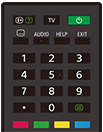
 (Tiedot/Tekstin näyttö)
Näytä tiedot.
TV
Vaihda televisiokanavaan tai tuloliitäntään ja tuo esiin TV-menu. Katso lisätietoja TV-menu käyttö ‑sivulta.
 (Virta)
Kytkee virran tai vaihtaa valmiustilaan tai verkkoyhteyttä tukevaan valmiustilaan.
 (Tekstityksen asetus)
Kytke tekstitys päälle tai pois (kun ominaisuus on käytettävissä).
AUDIO
Valitse ääni monikielisestä ohjelmasta tai kaksoisääni katsottavalle ohjelmalle (ohjelman lähteen mukaan).
HELP
Näytä Ohjevalikko. Käyttöopas on käytettävissä täältä käsin.
EXIT
Palaa edelliseen näyttöön tai poistu valikosta. Kun interaktiivinen sovelluspalvelu on käytettävissä, poistu palvelusta painamalla.
Numeropainike/・(Piste)
Valitse digitaaliset kanavat painikkeilla 0–9.
 (Teksti)
Näytä tekstitiedot.
Väripainikkeet
Suorita vastaava toiminto kyseisellä hetkellä.
Kaukosäätimen alemmat painikkeet
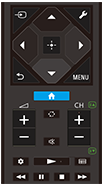
 (Tulon valinta)
Näytä ja valitse signaalilähde jne. Katso lisätietoja Tuloliitäntöjen valinta -sivulta.
 (Pika-asetukset)
Näytä Pika-asetukset. Katso lisätietoja Pika-asetukset käyttö ‑sivulta.
 (Ylös) /
 (Alas) /
 (Vasen) /
 (Oikea) /
 (Valitse) (Navigoinnin ristiohjain)
Näytön valikon navigointi ja valinta.
 (TAKAISIN)
Palaa edelliseen näyttöön.
 (HOME)
Näytä television Home-valikko. Katso lisätietoja Home-valikko ‑sivulta.
MENU
Näytä television valikko käyttääksesi toimintoja, joille ei ole painiketta kaukosäätimessä.
 +/- (Äänenvoimakkuus)
Säädä äänenvoimakkuutta.
 (Siirry)
Siirry edestakaisin kahden kanavan tai tuloliitännän välillä. Televisio vaihtelee nykyisen kanavan tai tuloliitännän ja viimeksi valitun kanavan tai signaalitulon välillä.
 (Mykistä)
Mykistä ääni. Palauta ääni painamalla uudelleen.
Vihje
- Esteettömyyspikavalintapalvelun voi kytkeä päälle tai pois päältä pitämällä
(Mykistä) -painiketta painettuna kolmen sekunnin ajan.
CH +/- (Kanava)
Televisiotilassa: Valitse kanava.
Tekstitilassa: Valitse
 (Seuraava) tai
 (Edellinen) sivu.
 (Hallintapaneeli)
Näytä Hallintapaneeli.
 (Toista) /
 (Nopea taaksepäinkelaus) /
 (Tauko) /
 (Pysäytä) /
 (Nopea eteenpäinkelaus)
Käytä mediasisältöä televisiossa ja liitetyllä BRAVIA Sync-yhteensopivalla laitteella.
 (Opas)
Näytä television tai Kaapeli/Satelliitti-vastaanottimen digitaalinen ohjelmaopas. Katso lisätietoja Ohjelmaoppaan käyttö ‑sivulta.
Sulje tämä näyttö ja siirry Asetukset-näyttöön valitsemalla seuraava linkki.
 Siirry Asetukset-näyttöön
Kaukosäätimen käyttöäänten mykistäminen
-
Paina kaukosäätimen
(Pika-asetukset) -painiketta ja poista äänet käytöstä valitsemalla seuraavat kohdat järjestyksessä.[Asetukset] — [Järjestelmä] — [Järjestelmän äänet]
Kaukosäätimen pariston vaihtaminen
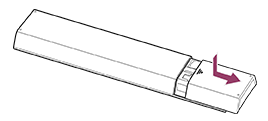
- Avaa kaukosäätimen kansi alla olevan kuvan mukaisesti.
- Irrota kaukosäätimen kansi ja vaihda paristot uusiin.
- Tarkista, että paristot ovat oikeinpäin paristokotelon plus- (+) ja miinus-symbolien (-) mukaisesti.
-
Liukuva
-