


IR daljinski upravljač
Priloženi daljinski upravljač te izgled gumba i nazivi gumba mogu se razlikovati ovisno o modelu / zemlji / regiji.
Gornji gumbi na daljinskom upravljaču

 (Otkrivanje informacija/Teksta)
Prikaz informacija.
TV
Prebacivanje na televizijski kanal ili ulaz i prikaz TV izbornik. Pojedinosti potražite na stranici Upotreba TV izbornik .
 (Napajanje)
Uključuje ili prebacuje u stanje pripravnosti / umreženo stanje pripravnosti.
 (Postavka za titlove)
Uključite ili isključite titlove (kada je značajka dostupna).
AUDIO
Odaberite zvuk iz višejezičnog izvora ili dvostruki zvuk za program koji trenutno gledate (ovisno o izvoru programa).
HELP
Prikaz izbornika Pomoć. Vodiču Vodič za pomoć moguće je pristupiti s ovog mjesta.
EXIT
Povratak na prethodni zaslon ili izlaz iz izbornika. Ako je dostupna usluga Interaktivne aplikacije, pritisnite za izlaz iz usluge.
Gumb Broj/・(Točka)
Gumbima od 0 do 9 odaberite digitalne kanale.
 (Tekst)
Prikaz tekstnih informacija.
Gumbi u boji
Provedba odgovarajuće funkcije u određeno vrijeme.
Donji gumbi na daljinskom upravljaču
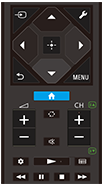
 (Odabir ulaza)
Prikaz i odabir izvora ulaza itd. Pojedinosti potražite na stranici Odabir ulaza.
 (Brze postavke)
Prikaz opcije Brze postavke. Pojedinosti potražite na stranici Upotreba Brze postavke .
 (gore) /
 (dolje) /
 (lijevo) /
 (desno) /
 (unos) (navigacijske tipke za smjer)
Navigacija izbornikom na zaslonu i odabir.
 (NATRAG)
Povratak na prethodni zaslon.
 (POČETAK)
Prikaz početnog izbornika televizora. Pojedinosti potražite na stranici Izbornik početnog zaslona.
MENU
Prikažite izbornik na televizoru kako biste mogli koristiti funkcije gumba kojih nema na daljinskom upravljaču.
 +/- (Glasnoća)
Podešavanje glasnoće.
 (Skok)
Prebacivanje između dva kanala ili ulaza. Televizor prebacuje između trenutačnog kanala ili ulaza i posljednjeg odabranog kanala ili unosa.
 (Prigušivanje)
Isključivanje zvuka. Pritisnite ponovno kako biste uključili zvuk.
Savjet
- Usluga prečaca za pristupačnost može se uključiti ili isključiti tako što pritisnete i držite gumb
(Prigušivanje) tri sekunde.
CH +/- (Kanal)
U načinu rada televizora: Odaberite kanal.
U načinu rada teksta: Odaberite
 (sljedeću) ili
 (prethodnu) stranicu.
 (Nadzorna ploča)
Prikaz opcije Nadzorna ploča.
 (Reprodukcija) /
 (Brzo premotavanje unatrag) /
 (Pauza) /
 (Stop) /
 (Brzo premotavanje unaprijed)
Upravljajte medijskim sadržajima na televizoru i povezanim uređajem kompatibilnim s BRAVIA Sync.
 (Vodič)
Prikažite digitalni vodič kroz programe na televizoru ili kabelskom / satelitskom prijemniku. Pojedinosti potražite na stranici Upotreba programskog vodiča.
Kako biste zatvorili ovaj zaslon i otišli na zaslon Postavke, odaberite sljedeću poveznicu.
 Idite na zaslon Postavke
Kako utišati zvuk rada daljinskog upravljača
-
Na daljinskom upravljaču pritisnite gumb
(Brze postavke), a zatim odaberite sljedeće tim redoslijedom kako biste ih onemogućili.[Postavke] — [Sustav] — [Zvukovi sustava]
Više o zamjeni baterije daljinskog upravljača
- Otvorite poklopac na daljinskom upravljaču kako je prikazano u nastavku.
- Uklonite poklopac daljinskog upravljača i zamijenite baterije novima.
- Provjerite je li svaka baterija u pretincu za baterije okrenuta u skladu s pozitivnom (+) i negativnom (-) oznakom.
-
Klizni tip

-