


Telecomando IR
Il telecomando in dotazione, così come la disposizione e i nomi dei pulsanti, possono variare a seconda del modello, del paese e dell’area geografica.
Pulsanti superiori del telecomando
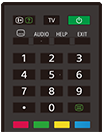
 (Visualizzazione Info/Televideo)
Visualizza le informazioni.
TV
Seleziona un canale o un ingresso del televisore, e consente di visualizzare la Menu TV. Per i dettagli, consultare la pagina Utilizzo del Menu TV .
 (Alimentazione)
Attiva o passa alla modalità standby/connesso in standby.
 (Impostazione sottotitoli)
Abilita o disabilita i sottotitoli (se disponibili).
AUDIO
Selezionare l’audio della sorgente multilingue o il doppio audio per il programma in corso di visione (a seconda della sorgente del programma).
HELP
Visualizza il menu Guida. Consente di utilizzare la Guida.
EXIT
Richiama la schermata precedente o consente di uscire dal menu. Se è disponibile il servizio di applicazioni interattive, consente di uscire dal servizio.
Pulsante numerico/・(Puntino)
Utilizzare i pulsanti 0-9 per la selezione dei canali digitali.
 (Televideo)
Visualizza il Televideo.
Pulsanti colorati
Eseguono la funzione assegnata.
Pulsanti inferiori del telecomando
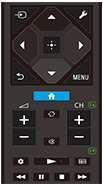
 (Selezione ingresso)
Visualizzare e selezionare la sorgente di ingresso, ecc. Per i dettagli, consultare la pagina Selezione degli ingressi.
 (Impostazioni rapide)
Visualizzare Impostazioni rapide. Per i dettagli, consultare la pagina Utilizzo del Impostazioni rapide .
 (Su) /
 (Giù) /
 (Sinistra) /
 (Destra) /
 (Invio) (Cursori di navigazione)
Consentono di navigare tra i menu e selezionare le diverse voci.
 (PRECEDENTE)
Richiama la schermata precedente.
 (HOME)
Visualizza il menu Home del televisore. Per i dettagli, consultare la pagina Menu Home.
MENU
Visualizza un menu sul televisore che consente di utilizzare sullo schermo le funzioni dei pulsanti che non si trovano sul telecomando.
 +/- (Volume)
Regola il volume.
 (Alterna)
Alterna due canali o due ingressi tra loro. Può essere usato per fare avanti e indietro tra il canale o l’ingresso correnti e il canale o ingresso precedentemente selezionati.
 (Escludere l’audio)
Esclude l’audio. Premere nuovamente il pulsante per ripristinare l’audio.
Suggerimento
- È possibile attivare o disattivare il servizio di scorciatoia di accessibilità tenendo premuto
(Escludere l’audio) per 3 secondi.
CH +/- (Canale)
In modalità Televisore: Seleziona il canale.
In modalità Televideo: Seleziona la pagina
 (Successiva) o
 (Precedente).
 (Dashboard)
Visualizzare Dashboard.
 (Riproduzione) /
 (Indietro veloce) /
 (Pausa) /
 (Interruzione) /
 (Avanti veloce)
Controllano il contenuto visualizzato sul televisore e del dispositivo BRAVIA Sync compatibile collegato.
 (Guida)
Visualizza la guida dei programmi digitali del televisore o del ricevitore cavo/satellite. Per i dettagli, consultare la pagina Uso della guida ai programmi.
Per chiudere questa schermata e passare alla schermata Impostazioni, selezionare il seguente link.
 Saltare alla schermata Impostazioni
Come disattivare i suoni operativi del telecomando
-
Premere il pulsante
(Impostazioni rapide) del telecomando, quindi selezionare quanto indicato di seguito per disattivarli.[Impostazioni] — [Sistema] — [Suoni di sistema]
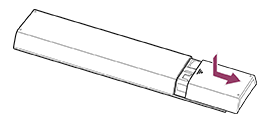
Informazioni sulla sostituzione della batteria del telecomando
- Aprire il coperchio del telecomando come indicato di seguito.
- Rimuovere il coperchio del telecomando e sostituire le batterie con delle batterie nuove.
- Verificare che l’orientamento di ciascuna batteria sia conforme ai simboli dei poli positivo (+) e negativo (-) nel vano batterie.
-
Tipo a scorrimento
-