


IR nuotolinio valdymo pultas
Kartu parduodamas nuotolinio valdymo pultas, taip pat mygtukų išdėstymas ir mygtukų pavadinimai skiriasi, priklausomai nuo turimo modelio, šalies ar regiono.
Viršutiniai nuotolinio valdymo pulto mygtukai
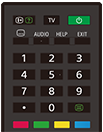
 (informacijos / teksto parodymas)
Ekrane įjunkite informaciją.
TV
Perjunkite į televizijos kanalą arba įvestį ir ekrane įjunkite Telev. meniu. Išsamios informacijos ieškokite puslapyje „„Telev. meniu“ naudojimas“.
 (Maitinimas)
Įjungia arba perjungia į budėjimo / budėjimo tinkle režimą.
 (subtitrų nustatymas)
Įjunkite arba išjunkite subtitrus (jei tokia funkcija yra).
AUDIO
Šiuo metu žiūrimai programai pasirinkite daugiakalbio šaltinio garsą arba dvejopą garsą (priklausomai nuo programos šaltinio).
HELP
Ekrane įjunkite „Žinyno meniu“. Žinynas galima pasiekti iš čia.
EXIT
Grįžkite į ankstesnį ekraną arba išeikite iš meniu. Jei teikiama interaktyviųjų programų paslauga, paspauskite, kad paslaugą išjungtumėte.
Skaitinis mygtukas /・(taškas)
Naudokite su mygtukais 0–9, kad pasirinktumėte skaitmeninius kanalus.
 (tekstas)
Ekrane įjunkite tekstinę informaciją.
Spalviniai mygtukai
Konkrečiu metu atlikite atitinkamas funkcijas.
Apatiniai nuotolinio valdymo pulto mygtukai
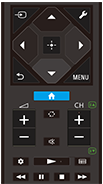
 (įvesties pasirinkimas)
Įjunkite ekrane ir pasirinkite įvesties šaltinį, ir pan. Informacijos ieškokite puslapyje „Įvesčių pasirinkimas“.
 (Greitieji nustatymai)
Įjunkite „Greitieji nustatymai“. Išsamios informacijos ieškokite puslapyje „„Greitieji nustatymai“ naudojimas“.
 (į viršų) /
 (žemyn) /
 (kairėn) /
 (dešinėn) /
 (įvesti) (naršymas keturkrypčiu valdikliu)
Naršymas ir pasirinkimas ekraniniame meniu.
 (ATGAL)
Grįžkite į ankstesnį ekraną.
 (NAMAI)
Ekrane įjunkite televizoriaus „Namų meniu“. Išsamios informacijos ieškokite puslapyje „Namų meniu“.
MENU
Parodomas televizoriaus meniu, kad galėtumėte naudoti mygtukų funkcijas, kurių nėra nuotolinio valdymo pulte.
 +/- (Garsas)
Nustatykite garsą.
 (perjungti)
Junginėkite iš vieno į kitą tarp dviejų kanalų arba įvesčių. Televizorius perjungia tarp dabartinio kanalo ar įvesties ir paskutinį kartą pasirinkto kanalo ar įvesties.
 (nutildyti)
Išjunkite garsą. Dar kartą paspauskite, kad įjungtumėte garsą.
Patarimas
- Pritaikymo neįgaliesiems sparčiąją funkciją galima įjungti ir išjungti paspaudus ir 3 sekundes palaikius
(nutildyti).
CH +/- (kanalas)
Televizoriaus režime: Pasirinkite kanalą.
Teksto režime: Pasirinkite
 (kitą) arba
 (ankstesnį) puslapį.
 (Informacijos suvestinė)
Įjunkite „Informacijos suvestinė“.
 (paleidimas) /
 (greitas sukimas atgal) /
 (pristabdymas) /
 (sustabdymas) /
 (greitas sukimas pirmyn)
Valdykite medijos turinį televizoriuje ir prijungtuose su BRAVIA Sync suderinamuose įrenginiuose.
 (gidas)
Rodo televizoriaus arba priedėlio elektroninį programų gidą. Išsamios informacijos ieškokite puslapyje „Programų gido naudojimas“.
Norėdami uždaryti šį ekraną ir pereiti į Nustatymai ekraną pasirinkite šią nuorodą.
 Atidarykite Nustatymai ekraną.
Kaip nutildyti nuotolinio valdymo pulto veikimo garsą
-
Paspauskite nuotolinio valdymo pulto mygtuką
(Greitieji nustatymai) ir pasirinkite toliau nurodyta tvarka norėdami išjungti.[Nustatymai], [Sistema] ir [Sistemos garsai]
Kaip pakeisti nuotolinio valdymo pulto bateriją
- Atidarykite nuotolinio valdymo pulto dangtelį, kaip parodyta toliau.
- Nuimkite nuotolinio valdymo pulto dangtelį ir baterijas pakeiskite naujomis.
- Patikrinkite, ar kiekvienos baterijos padėtis atitinka teigiamą (+) ir neigiamą (-) simbolius baterijų skyriuje.
-
Slankiojo tipo
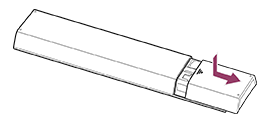
-