


Infrasarkanā tālvadības pults
Atkarībā no ierīces modeļa/valsts/reģiona komplektācijā ietvertā tālvadības pults, kā arī pogu izkārtojums un pogu nosaukumi var atšķirties.
Tālvadības pults augšējās pogas
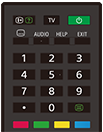
 (inform./rādīt tekstu)
Attēlojiet informāciju.
TV
Pārslēdzieties uz televīzijas kanālu vai ievadi un attēlojiet TV izvēlne. Plašāku informāciju skatiet lapā TV izvēlne lietošana.
 (Ieslēgšanas)
Ieslēdzas vai pārslēdzas gaidstāves/tīkla gaidstāves režīmā.
 (subtitru iestatījums)
Ieslēdziet vai izslēdziet subtitrus (ja funkcija ir pieejama).
AUDIO
Attiecīgajā brīdī skatītajai programmai (atkarībā no programmas avota) atlasiet daudzvalodu avota skaņu vai duālu skaņu.
HELP
Attēlojiet palīdzības izvēlni. Šajā sadaļā var piekļūt Palīdzības ceļvedis.
EXIT
Atgriezieties iepriekšējā ekrānā vai aizveriet izvēlni. Ja ir pieejams interaktīvās lietotnes pakalpojums, nospiediet, lai aizvērtu pakalpojumu.
Ciparu poga/・(punkts)
Izmantojiet pogas 0–9, lai atlasītu digitālos kanālus.
 (teksts)
Attēlojiet teksta informāciju.
Krāsu pogas
Veiciet konkrētajā brīdī atbilstošo funkciju.
Tālvadības pults apakšējās pogas
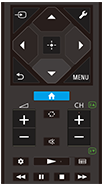
 (ievades atlase)
Rāda un atlasa ievades avotu u. c. Plašāku informāciju skatiet lapā Ievades atlasīšana.
 (Ātrie iestatījumi)
Rāda Ātrie iestatījumi. Plašāku informāciju skatiet lapā Ātrie iestatījumi lietošana.
 (uz augšu) /
 (uz leju) /
 (pa kreisi) /
 (pa labi) /
 (ievadīt) (navigācijas D poga)
Navigācija izvēlnēs un atlase ekrānā.
 (ATPAKAĻ)
Atgriezieties iepriekšējā ekrānā.
 (SĀKUMS)
Attēlojiet televizora sākuma izvēlni. Plašāku informāciju skatiet lapā Sākuma izvēlne.
MENU
Parādiet televizorā izvēlni, lai ekrānā izmantotu pogas funkcijas, kas nav uz tālvadības pults.
 +/- (Skaļums)
Pielāgojiet skaļumu.
 (pārslēgties)
Pārslēdzieties starp diviem kanāliem vai ievadēm. Televizors pārslēdzas starp pašreizējo kanālu vai ievadi un pēdējo atlasīto kanālu vai ievadi.
 (izslēgt skaņu)
Izslēdziet skaņu. Nospiediet vēlreiz, lai skaņu atkal ieslēgtu.
Padoms
- Pieejamības saīsnes pakalpojumu var ieslēgt vai izslēgt, 3 sekundes turot nospiestu pogu
(izslēgt skaņu).
CH +/- (kanāls)
Televizora režīmā: Atlasiet kanālu.
Teksta režīmā: atlasiet lapu
 (nākamā) vai
 (iepriekšējā).
 (Informācijas panelis)
Rāda Informācijas panelis.
 (atskaņot) /
 (ātri attīt) /
 (pauze) /
 (apturēt) /
 (paātrināt)
Lietojiet multivides saturu televizorā un pievienotajā ar BRAVIA Sync saderīgajā ierīcē.
 (ceļvedis)
Attēlojiet televizora vai kabeļtelevīzijas/satelīta uztvērēja digitālo programmu ceļvedi. Plašāku informāciju skatiet lapā Programmu ceļveža izmantošana.
Lai aizvērtu šo ekrānu un pārietu uz Iestatījumi ekrānu, atlasiet šo saiti.
 Pāreja uz Iestatījumi ekrānu.
Tālvadības pults darbības skaņas izslēgšana
-
Lai atspējotu, nospiediet tālvadības pults pogu
(Ātrie iestatījumi) un atlasiet tālāk norādītās opcijas norādītajā secībā.[Iestatījumi] — [Sistēma] — [Sistēmas signāli]
Par tālvadības pults baterijas maiņu
- Atveriet tālvadības pults pārsegu, ka parādīts tālāk.
- Noņemiet tālvadības pults vāciņu un ievietojiet jaunas baterijas.
- Pārbaudiet, vai katras baterijas orientācija atbilst bateriju nodalījumā esošo pozitīvo (+) un negatīvo (-) simbolu novietojumam.
-
Bīdāms vāciņš

-