


IR-Afstandsbediening
Welke afstandsbediening wordt meegeleverd en wat de lay-out/naam van de knoppen is, is afhankelijk van uw model/land/regio.
Bovenste knoppen op de afstandsbediening
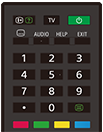
 (info/tekst weergeven)
Informatie weergeven.
TV
Omschakelen naar een tv-zender of ingang en de TV-menu weergeven. Raadpleeg voor meer informatie de pagina Het TV-menu gebruiken.
 (Aan/uit)
Hiermee zet u het tv-toestel aan of in stand-by/stand-by in netwerk.
 (ondertitelinstelling)
Ondertitels in- of uitschakelen (wanneer deze functie beschikbaar is).
AUDIO
Meertalig brongeluid of twee geluidssignalen selecteren voor het programma dat u aan het bekijken bent (afhankelijk van de programmabron).
HELP
Het Helpmenu van het tv-toestel weergeven. Op deze manier kunt u de Helpgids openen.
EXIT
Terugkeren naar het vorige scherm of het menu sluiten. Wanneer een interactieve dienst beschikbaar is, drukt u hierop om de dienst te sluiten.
Cijferknoppen/・(bolletje)
Te gebruiken samen met de knoppen 0-9 voor het selecteren van digitale kanalen.
 (tekst)
Tekstinformatie weergeven.
Kleurknoppen
De functie uitvoeren die bij die kleur hoort.
Onderste knoppen op de afstandsbediening
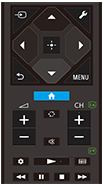
 (ingang selecteren)
De ingangsbron enz. weergeven en selecteren. Raadpleeg voor meer informatie de pagina Ingangen selecteren.
 (Snelle instellingen)
Snelle instellingen weergeven. Raadpleeg voor meer informatie de pagina Het Snelle instellingen gebruiken.
 (omhoog) /
 (omlaag) /
 (links) /
 (rechts) /
 (Enter) (navigatieknop)
Op het scherm door menu's navigeren en instellingen selecteren.
 (TERUG)
Naar het vorige scherm terugkeren.
 (START)
Het Startmenu van het tv-toestel weergeven. Raadpleeg voor meer informatie de pagina Startmenu.
MENU
Een menu op het tv-toestel weergeven met daarin functies die niet op de afstandsbediening staan.
 +/- (volume)
Het volume aanpassen.
 (wisselen)
Heen en weer gaan tussen twee kanalen of ingangen. Het tv-toestel wisselt af tussen het huidige kanaal of de huidige ingang en het kanaal of de ingang die u daarvoor hebt gebruikt.
 (dempen)
Het geluid dempen. Opnieuw drukken om het geluid te herstellen.
Hint
- De sneltoetsfunctie voor de toegang kunt u in- en uitschakelen door
(dempen) 3 seconden ingedrukt te houden.
CH +/- (kanaal)
In tv-modus: Kanaal selecteren.
In tekstmodus:
 (volgende) of
 (vorige) pagina selecteren.
 (Dashboard)
Dashboard weergeven.
 (afspelen) /
 (snel achteruit) /
 (pauze) /
 (stop) /
 (snel vooruit)
Inhoud bedienen op het tv-toestel en op apparaten die compatibel zijn met BRAVIA Sync.
 (gids)
De digitale programmagids van het tv-toestel of de kabel/satelliet receiver weergeven. Raadpleeg voor meer informatie de pagina De programmagids gebruiken.
Selecteer de volgende link om dit scherm te sluiten en naar het Instellingen-scherm te gaan.
 Ga naar het Instellingen-scherm
Het geluid van het gebruik van de afstandsbediening uitschakelen
-
Druk op de
(Snelle instellingen)-knop op de afstandsbediening en selecteer achtereenvolgens de volgende instellingen om het geluid uit te schakelen.[Instellingen] — [Systeem] — [Systeemgeluiden]
De batterij van de afstandsbediening vervangen
- Open het klepje van de afstandsbediening zoals hieronder getoond.
- Schuif het klepje van de afstandsbediening open en vervang de batterijen door nieuwe.
- Ga na of de polen van de batterij overeenstemmen met het positieve (+) en negatieve (-) symbool in het batterijvak.
-
Schuiven

-